Fix: VSCode + ElixirLS Intellisense for code imported with `use`
I am using VSCode with the ElixirLS extension for Elixir development. My operating system is Ubuntu, but I think this guide should work for other systems if you know where to find your VSCode extensions folder.
The problem: IntelliSense, aka ElixirSense, and jump to definition, would not work for functions and macros imported with use. For example, while working on a Phoenix project, I would not get any code completion or useful suggestions inside a Schema module for macros such as field, embedded_schema, etc. IntelliSense would work for other code explicitly imported in the same module, or for functions referenced by their full name, ie Kernel.update_in/3. So for a long time, I thought this was the correct way that ElixirLS was working, and that I couldn’t get IntelliSense for code imported via use.
The troubleshooting: After a little bit of research, I found out that ElixirLS should actually provide IntelliSense for code imported with use (source). I also found out that the ElixirLS (the language server) that came with the ElixirLS extension I installed from the marketplace, was actually compiled with an older version of Elixir: v1.8 vs my current v1.11.2. Due to this version difference, IntelliSense would not work properly in some circumstances. If you want to find out these versions, you can see this information in the ‘Output’ tab, for the ‘ElixirLS’ extension as seen below:
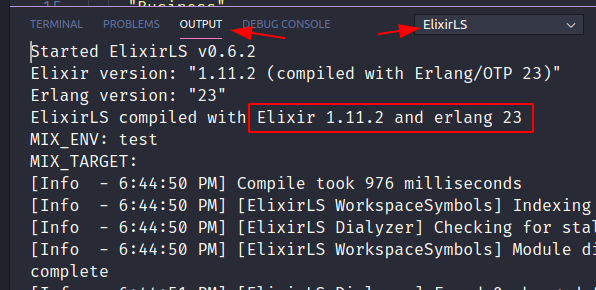
I took this screenshot after I had updated the ElixirLS language server in my extension, but previously it was showing “ElixirLS compiled with Elixir 1.8 and erlang 21”.
The fix: In order to fix this, I found the following instructions helpful. This is what I did:
- Find my ElixirLS extension’s folder. One way to do it, is from the ‘Output’ tab again. See [this screenshot]. In my case, the folder would be at
~/.vscode/extensions/jakebecker.elixir-ls-0.6.5/ - Somewhere, clone the ElixirLS repository:
git clone --depth 1 https://github.com/elixir-lsp/elixir-ls - Now
cd elixir-lsand runmix deps.getto get the dependencies - Now in this next step, we will need to use the ElixirLS extension folder path we found in step 1, and build the path to the inner ‘elixir-ls-release’ folder, so the full path we’re interested in should be something like
~/.vscode/extensions/jakebecker.elixir-ls-0.6.5/elixir-ls-release/ - Close your VSCode application if running
- We are now going to build the ElixirLS (the language server) using our system’s Elixir & Erlang versions. Run
mix elixir_ls.release -o ~/.vscode/extensions/jakebecker.elixir-ls-0.6.5/elixir-ls-release/ - Next, I am not sure if this is really needed, but I removed the
.elixir_lsfolder in my project to let the extension rebuild it. - Launch VSCode and check if IntelliSense is working properly (hopefully it does)
Here’s the entire list of commands I ran:
cd ~
git clone --depth 1 https://github.com/elixir-lsp/elixir-ls
cd elixir-ls
mix deps.get
mix elixir_ls.release -o ~/.vscode/extensions/jakebecker.elixir-ls-0.6.5/elixir-ls-release/
Also, if you’d like to create this as a script you can run whenever the extension is updated, here’s what I use, which you can adapt to your needs:
#!/bin/bash

cd ~/Software

if [ -d "$HOME/Software/elixir-ls" ] ; then
    rm -rf ~/Software/elixir-ls
fi

git clone --depth 1 https://github.com/elixir-lsp/elixir-ls

cd elixir-ls

mix deps.get

mix elixir_ls.release -o ~/.vscode/extensions/jakebecker.elixir-ls-*/elixir-ls-release/
If you decide to use this script, note that when you update the extension in VSCode, you’ll get two folders of the extension (old and new versions). When you restart the editor, the old extension folder will be removed, so you’ll end up with one folder only. I am mentioning this because if you update the extension, close the editor, and run the script above, the extension LS module will be rebuilt in the old folder, since the wildcard path will match the first folder. You either need to restart the editor, close it, and then run this script. Or, remove the old extension folder manually, then run the script. Or even better, if you dig bash, let me know how I can update the script to match the folder of the latest version 🙂
Please note, as one ElixirLS team member mentioned here , if your project is using an Elixir version older than what the LS module was built with, the LS may not work for you. This may apply if you use multiple Elixir versions, for example if you use asdf.
If you found the information in this article useful, feel free to spread the word with a link-back to help those other Elixir devs who may not be using ElixirLS Intellisense to its full potential.